


How to Easily Track Your Freight Shipments
octobre 23, 2026

Key Takeaways
Tracking your freight involves more than checking its location. Knowing where to find pickup updates, tracking information, and shipment notifications can help you stay informed and find answers quickly without having to contact customer support.
- Check your Freightquote dashboard for scheduled pickup status and request updates when needed.
- Understand that a "verifying" status means Freightquote is confirming pickup details, not necessarily that a pickup was missed.
- Allow time for tracking information to appear after pickup. Updates may take a few hours or up to 24 hours, depending on the carrier.
- Manage shipments in one place with access to tracking details, shipping documents, delivery confirmations and customizable notifications.
Keeping tabs on a freight shipment involves more than checking a tracking number. You may want to confirm that a pickup is on schedule, find out why tracking information hasn't appeared yet, or see when your shipment is expected to arrive.
Freightquote makes it easier to manage these details in one place. Your dashboard gives you access to shipment status updates, tracking information, delivery confirmations and notifications to help you stay informed from pickup through delivery.
Here's how to use Freightquote's simple tracking tools, understand the different shipping numbers you may come across, and find answers to common tracking questions.
Breaking down the most important freight tracking numbers
When you book a shipment, you'll encounter a few different numbers. Knowing what each one does can help you find the information you need.
Order number: Your order number is one of the most important numbers to know when tracking a shipment. It's a numeric code you can find on your shipment confirmation page and in your confirmation email. Once you sign in to Freightquote, you can use this number to find your shipment on your dashboard.
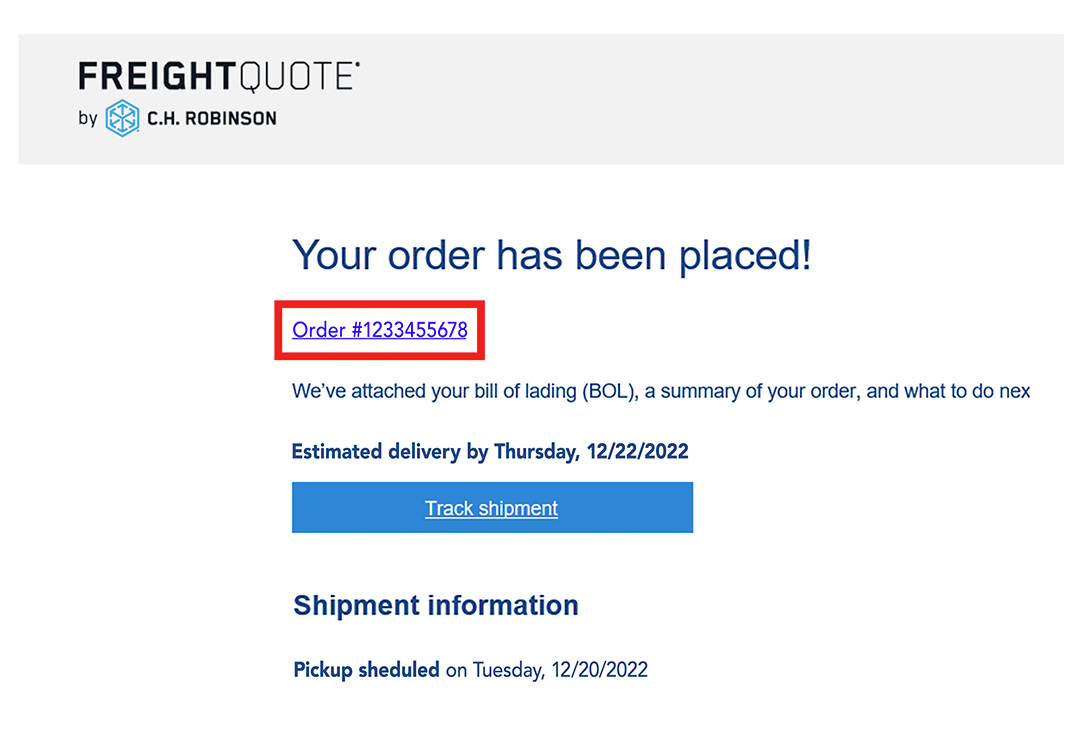
Freightquote tracking number: This alphanumeric code, which contains both letters and numbers, is generated when you book a shipment through Freightquote. It's included in your shipping confirmation email and lets you track your shipment on Freightquote.com without signing in to your account. It's also useful when you need to share shipment details with someone else.
Visit our track a shipment page to get started.

Other shipping numbers to know
BOL number: Your bill of lading (BOL) number identifies your shipment on its shipping documentation. For Freightquote shipments, this number is the same as your order number and can be found on your BOL.
Pickup number: Carriers use this number to reference pickup information before your freight is collected. You don't typically need it for everyday tracking, but it can be helpful if you need to contact a carrier directly with a specific pickup question.
PRO number: Short for Progressive Rotating Order, this is the carrier's primary tracking number. Some carriers assign this number when your order is placed, and others assign it at the time of pickup. The carrier uses it to identify and track your shipment as it moves through the transportation process and toward delivery.
Easily track your shipments from your Freightquote account
Once you've placed a shipping order, you can find its details on your Freightquote dashboard. You'll set up an account when you book your first shipment, giving you a central place to manage your orders and check their status.
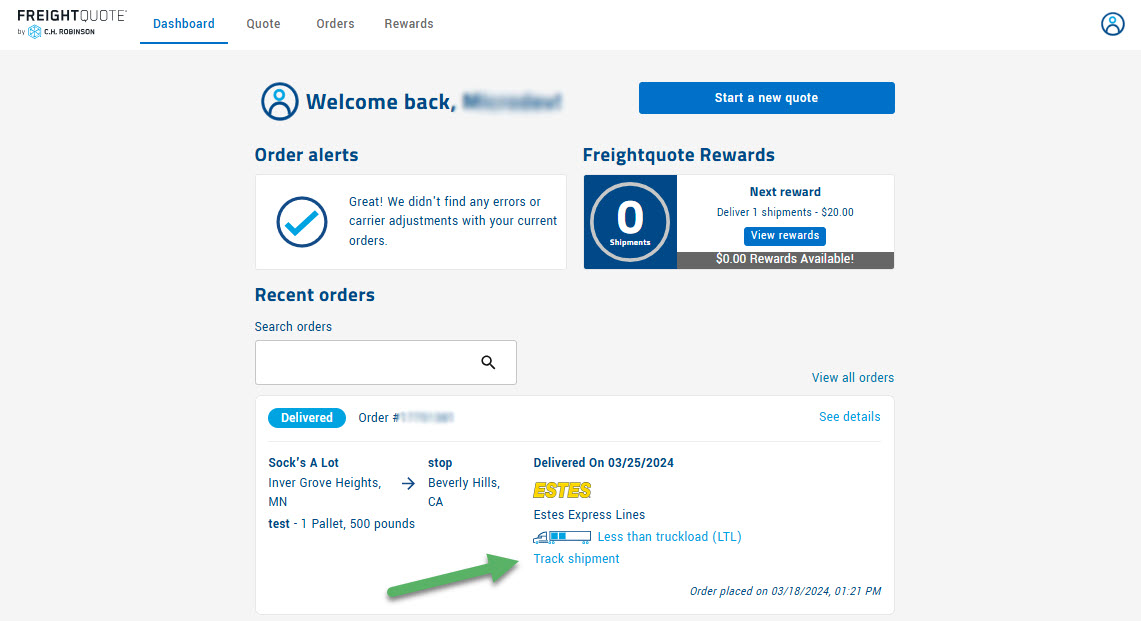
To find a shipment, sign in to your dashboard and search by order number, or locate the order you need and select "track shipment" beneath the carrier logo.
If you prefer proactive tracking updates, you can sign up for shipment notifications in the Account section of your dashboard. Choose email, text messages, or both. You can also select the updates that matter most to you, including shipment status changes, delivery confirmation, and delay information.
Check your pickup status before your freight is on the move
Tracking doesn't begin and end with an in-transit shipment. If you're waiting for a carrier to pick up your freight, your Freightquote dashboard can help you check the latest available information and understand what to expect.
Where can I check the status of today's pickup?
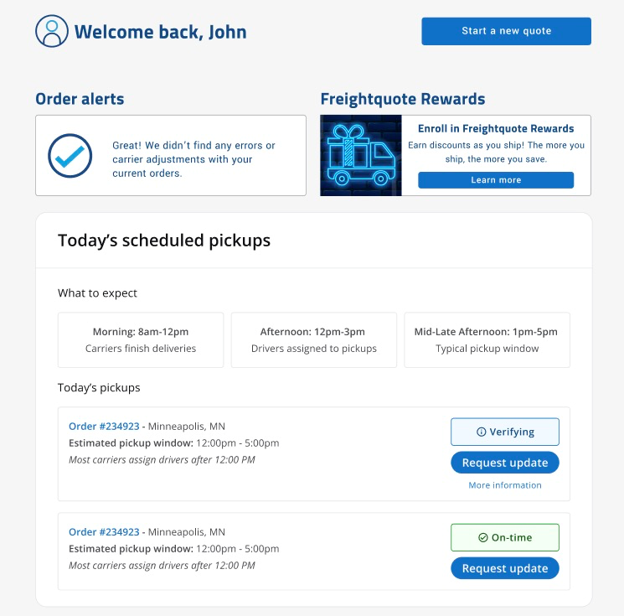
Start with the "today's scheduled pickups" section of your Freightquote dashboard. It provides real-time updates for shipments scheduled to be picked up that day, including whether a pickup is on time or requires verification.
Checking this section is a good first step if you're waiting for a driver or want to confirm the status of a scheduled pickup.
When will I receive a pickup ETA?
It's common for a pickup ETA to be unavailable first thing in the morning. Less than truckload (LTL) carriers typically don't assign pickups to drivers until the afternoon of the scheduled pickup day.
That's because drivers often complete deliveries in the morning before starting their pickup routes. As a result, pickup timing can vary throughout the afternoon, and a specific ETA may not be available until later in the day.
Need an update on pickup day? Select "request update" in your Freightquote dashboard to get the most current information available from the carrier.
What does "verifying" mean in my dashboard?
If a shipment shows a "verifying" status, it means Freightquote is confirming the pickup status because tracking information hasn't yet been received from the carrier.
In many cases, the freight has already been picked up, but the tracking updates haven't made their way through the carrier's systems yet. Freightquote automatically begins working with the carrier to obtain tracking details and update your dashboard as quickly as possible.
If the carrier confirms that the pickup didn't happen as scheduled, Freightquote will notify you by email with the latest information, including any revised pickup timing or rescheduling instructions.
A "verifying" status doesn't automatically mean your pickup was missed. Check your dashboard for updates, and use the "request update" option when you need the latest available information.
Tracking your shipment in transit
Once your freight has been picked up, you can use your Freightquote dashboard to follow its progress. Tracking information is provided by the carrier, so the timing and level of detail available can vary.
Why don't I see tracking information yet?
Tracking information doesn't always appear as soon as a shipment is picked up. The timing depends on the carrier and how quickly its systems process and share tracking updates.
Many national LTL carriers provide tracking information within a few hours of pickup. Some regional carriers may take up to 24 hours to make that information available.
Freightquote receives tracking updates directly from carriers and automatically updates your dashboard as information becomes available. If you don't see tracking details right away, check your dashboard again later for the latest status.
If you're concerned about a shipment or need help understanding its status, our Customer Support team can help you connect with the carrier when necessary.
Use Freightquote to manage all your shipments
Your Freightquote dashboard offers more than shipment tracking. It also gives you a central place to manage your less than truckload (LTL), truckload (TL) and parcel shipments, even when you're using different carriers.
Depending on your shipment, you can access important details such as:
- Shipment status updates: Check the latest available information about your freight.
- Pickup information: Review the status of scheduled pickups and request updates when needed.
- Delivery confirmation: Find out when your shipment has been delivered.
- Delay notifications: Stay informed when updates about a delay become available.
- Shipping documents: Access important paperwork associated with your orders.
- Tracking notifications: Choose email or text updates based on your preferences.
Having these details in one place makes it easier to manage shipments without having to track down information across multiple systems.
To get started, sign in to your Freightquote dashboard or create an account when you're ready to book your next shipment.
Track your freight with confidence
From confirming a scheduled pickup to following freight in transit, knowing where to look can save you time and make shipment management easier.
Use your Freightquote dashboard to check pickup status, request the latest available updates, find tracking information and customize notifications for your shipments. Keep in mind that tracking details and pickup ETAs depend on the carrier, so some information may take time to appear.
When you know how to use these tools, you can find the information you need and keep your freight moving with Freightquote.
Topics:
Get Your Shipping Quote

A guide to shipping freight
Get expert freight shipping tips and easy tools to help ship your freight more efficiently.
Read the free guide